Roadmap
What shipped in 1.0. What comes next.
null.audio 1.0 brings ALIGN and EDIT to Ableton Live on macOS and Windows, with up to eight Dubs against one Guide in one go. Next up: null.audio 1.1, with whole verses in EDIT and a redesigned EDIT panel.
Where it stands
null.audio 1.0 is out.
Released in 1.0
ALIGN with up to eight Dubs at once, EDIT, one shared app and device, signed installers for macOS and Windows.
Next
null.audio 1.1: whole verses in EDIT and a redesigned panel.
Released in 1.0
- Shipped
ALIGN: alignment workflow
Set Guide, Set Dub, Align, Commit, Revert. The complete alignment workflow inside Live.
Select a Guide clip, select a Dub clip, and VocAlign Pro or Standard opens with both already in it. Commit puts the aligned Dub back on its track in Arrangement View. Warped and stretched clips are prepared for you, and every action can be mapped to a key or MIDI control.
- Shipped
ALIGN: several Dubs in one go
Set one Guide and align up to eight doubles and harmonies against it in one pass, with every VocAlign ALIGN works with.
Set one Guide, add up to eight Dubs, and align them all against it in one pass. Find Dubs lists the clips under the Guide and ticks the vocal takes for you; Add Dub adds the clip selected in Live. Commit puts each aligned Dub back on its own track, and Revert puts them all back. Works with every VocAlign ALIGN works with. Right after Set Guide the panel offers the Dubs it found and remembers your Dub tracks per Set; with "Align found Dubs right after Set Guide", one press does it all.
- Shipped
ALIGN Commit and Revert
Commit puts the aligned result in Arrangement View. Revert alignment puts the prepared Dub back.
Commit replaces the Dub clip in Arrangement View with a fresh render of the current VocAlign state. Revert alignment restores the prepared Dub captured before the first Commit of that Set Dub.
Revert changes only the Dub clip ALIGN is working on. Live Set undo remains separate, and null.audio never deletes files.
- Shipped
EDIT: ARA editing workflow
Select a clip, edit it in a compatible ARA editor, hear it against the mix in Live, and Commit the result to Arrangement View.
Open a clip in Melodyne, SpectraLayers, RePitch, Vovious or NoiseWorks VoiceAssist straight from Arrangement View. The EDIT Bridge plays your edit in the Live mix in real time, and Commit puts the edited clip back on its track; Revert puts the original back.
- Shipped
Shared runtime and launcher
One null.audio app and one null.audio.amxd device, so ALIGN and EDIT install together.
One installer puts the null.audio app, the
null.audio.amxddevice and the EDIT Bridge in place, with a view for each workflow. One update keeps them working together. - Shipped
Signed and notarized builds
A Developer ID signed, notarized macOS installer and a signed Windows installer.
The macOS installer is signed with an Apple Developer ID and notarized by Apple. The Windows installer is signed through Microsoft. Both install without security warnings.
- Shipped
Windows support
ALIGN and EDIT on Windows 11 as well as macOS, from the same purchase.
ALIGN and EDIT run on macOS 14 or later and Windows 11 with Ableton Live 12.3 or later. The tested setups list the exact versions. Other versions are untested rather than promised, until they are tested.
- Shipped
Lemon Squeezy checkout and key activation
Separate licences for ALIGN, EDIT and ALIGN + EDIT, activated with a key.
You buy through Lemon Squeezy and activate with a licence key in null.audio. Each licence works on two computers at once and keeps working offline. There is no account and no subscription.
- Shipped
ALIGN + EDIT bundle
Both products under one licence key.
null.audio ALIGN + EDIT unlocks both products with one key: €69 once, €19 less than buying both.
Coming in null.audio 1.1
- In development
EDIT: a whole verse, your doubles, or the whole track
Open every clip of a verse in one go, add the doubles on other tracks, or take the whole track, and tune it all in one Melodyne session.
Today EDIT opens one clip at a time. With 1.1, if your verse is made of several clips, for example because you cut together the best parts of different takes, you click one of them and EDIT opens all of them together in Melodyne.
If you recorded doubles or harmonies on other tracks, EDIT notices them and asks if you want to tune them in the same go. Or you take the whole track, from the first line to the last. While you tune, you can add a clip you forgot or take one out, without starting over. One button puts every tuned clip back on its own track, and you hear all of it in the Live mix the whole time.
- In development
A setup checklist
null.audio shows you what's set up and what's still missing, step by step, so the first edit just works.
On the first start, null.audio shows a short checklist: your licence, the null.audio device in Live, the EDIT Bridge on a track and, on macOS, the permission it needs. Each step turns green by itself when it's done, and the ones that aren't take you to the right place to fix them.
- In development
A redesigned EDIT panel
The EDIT panel you use today gets replaced by a cleaner, clearer one that always shows the one thing to do next.
The new panel sits next to Ableton and always shows you the one thing to do next, with one clear button for it. While the song plays, you can switch between your tuned version and the original. If something isn't set up yet, like the EDIT Bridge on a track, it tells you what's missing and how to fix it, in plain words. If you work with key mappings, you can shrink it to one line or keep it hidden; your keys work either way.
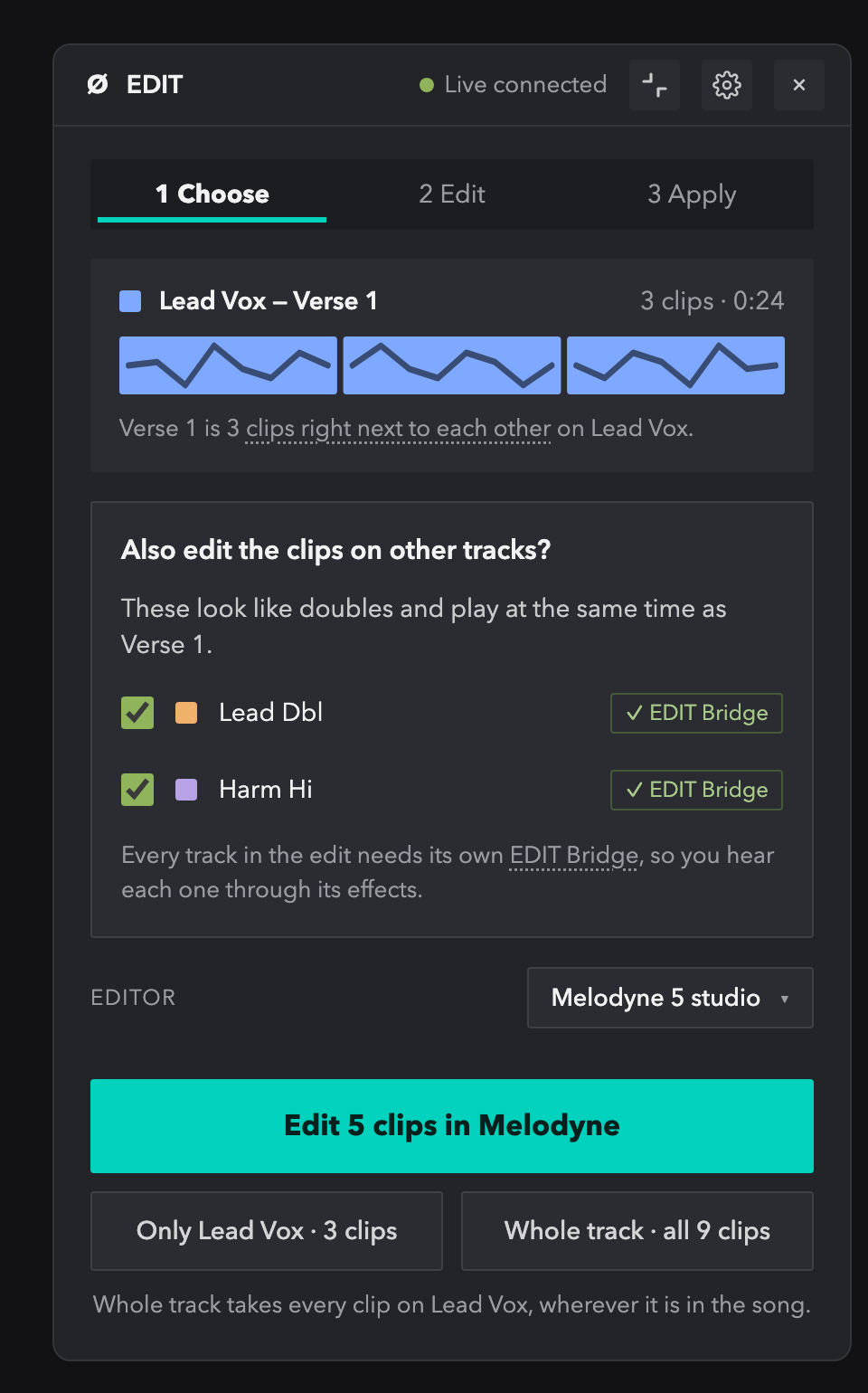
An early look. It's still a design, so details may change.
Later
- Exploring
ALIGN: our own alignment engine
An alignment engine built into null.audio, as an option next to VocAlign.
We are working on an alignment engine of our own, built into null.audio. It would let ALIGN line up doubles without a third-party plug-in. VocAlign stays fully supported. This is early work: we will only ship it once it sounds as good as you need it to.
- Exploring
ALIGN: Waves Sync VX
Use Waves Sync VX in ALIGN, as an option next to VocAlign.
null.audio already finds Sync VX on your computer and lists it as not supported yet. Sync VX lines up vocals differently from VocAlign, so ALIGN needs its own way of handing it the Guide and the Dubs. We'll look into it after null.audio 1.1. VocAlign stays fully supported.