Menu

null.audio ALIGN · macOS and Windows

VocAlign in Ableton Live, without the capture pass.

Select the Guide and a Dub in your Arrangement, or up to eight Dubs at once, with any VocAlign, Standard included. VocAlign opens with all of them already in it, so there's nothing to route and nothing to play in. Commit puts only the aligned Dubs back on their tracks.

ALIGN needs your own VocAlign Pro or Standard. It doesn't align anything by itself.

Introductory price €29 until 8 November 2026, then €39, incl. VAT. macOS and Windows · Ableton Live 12.3 or later · needs VocAlign Pro or Standard. Available now.

Before and after

Like Live had ARA. Nothing to record in.

Ableton Live doesn't support ARA. null.audio runs an ARA host in the background and connects it to your clips in Live.

Before ALIGN

Every take has to be played in first.

  1. Put VocAlign on the vocal tracks. With VocAlign 6, also route the Guide to its sidechain.
  2. Play the section through so VocAlign can record the Guide and Dubs in real time.
  3. To avoid rendering the full vocal chain, move the Dub to a clean track first, render it, then move the result back to the real vocal track.

Every new take or revision means doing this again.
With ALIGN

Nothing to route or play in.

  1. Select the Guide and press Set Guide.
  2. Select the Dub and press Set Dub.
  3. Press ALIGN. VocAlign opens with both clips already in it.
  4. Commit only the aligned Dub back to Arrangement View. Its vocal chain stays on the track.

Why ALIGN

Faster than doing it by hand. Even in a DAW with ARA.

Eight Dubs at once, found for you.

Press Set Guide and ALIGN finds the takes under it by their track names: Dbl, Double, Harm, BGV, Adlib, Stack, Vox and more. Up to eight go into VocAlign together.

No setting each take by hand. ALIGN also remembers which tracks held your Dubs and ticks them first next time. Tick Align found Dubs right after Set Guide, and one press does all of it.

Works with VocAlign 7 Pro and Standard, VocAlign 6 Pro, and on macOS VocAlign 6 Standard. How several Dubs work

Several Dubs in five steps, 20 seconds, no sound.
  • Straight into VocAlign

    Set the Guide and Dubs once in the ALIGN panel. VocAlign opens with all of them already in it: nothing to set again inside VocAlign, and no playing the section.

  • Your vocal chain stays

    Commit replaces only the Dub clips. Your EQ, compression and effects stay on the track, live. Nothing gets bounced through them, and no clean-track workaround.

  • Non-destructive

    Commit writes new files and never deletes your takes. Revert alignment puts every Dub back as it was. Your audio stays on your computer.

Also: warped and stretched clips are prepared for you, every button maps to keys or MIDI, and the null.audio app runs quietly in the menu bar (system tray on Windows).

Align your next stack in Live.

Requirements

What you need.

ALIGN works with VocAlign 7 Pro or Standard and VocAlign 6 Pro, and on macOS also VocAlign 6 Standard. Bring your own installation and licence.

System requirements

Ableton Live
Live 12.3 or later: Live 12 Suite, or Live 12 Standard with the Max for Live add-on. Older versions of Live are not supported
macOS
macOS 14 or later. Tested on Apple Silicon; Intel Macs untested
Windows
Windows 11, 64-bit
Plug-in format
VST3

Scope

Live view
Arrangement View only
Per alignment
One Guide and up to 8 Dubs
Installs
null.audio.amxd plus the null.audio app
Requires
Your own VocAlign Pro or VocAlign Standard licence and installation

The exact versions we test with are on the support page.

If Ableton is your main DAW

Three ways to align a vocal double.

The third column is the usual workaround: export the clips to a DAW with ARA, align them there and bring them back.

Scroll sideways to see the full table.

Three ways to align a vocal double when Ableton is the main DAW
VocAlign in LiveALIGN in LiveExport from Ableton to a DAW with ARA
Starting pointPut VocAlign on the tracks (VocAlign 6: route the Guide to its sidechain)Select Guide and Dub in LiveExport clips from Ableton
Realtime captureCapture Guide and Dub together while the section playsWorks from the selected clipsThe other DAW reads the export
Work from clipsOnly after realtime captureDirectly from the Guide and DubAfter export
Several doubles at onceRecorded in realtime; VocAlign 7 records a stack in one passUp to 8 Dubs in one pass, found by track nameDepends on the other DAW
Steps per alignmentInsert, record the takes in realtime, set Guide and Dubs in VocAlign, align, printSet Guide, Set Dub, Align, CommitExport from Ableton, align in the other DAW, export, import, re-position
Aligned audio in Arrangement ViewRender the full vocal chain, or prepare a clean track first and move the rendered clip backCommit replaces only the Dub clips while their vocal chains stay intactImport and place it yourself
Needs your own VocAlign Pro or Standard licenceYesYesYes

ARA is a technology of Celemony and PreSonus. null.audio is not affiliated with either.

Coming later

ALIGN without VocAlign.

I'm building an alignment engine into null.audio, so ALIGN can line up your doubles without a third-party plug-in.

It's early work and there's no date yet. It ships when it sounds as good as you need it to. VocAlign stays fully supported. Roadmap

Want to hear when the engine is ready? I'll send an email.

Questions about ALIGN

Before you buy.

Does Ableton Live support ARA?

No. Ableton Live 12 doesn't host ARA plug-ins, so Melodyne and VocAlign can't read your clips directly the way they do in Cubase, Studio One or REAPER. null.audio fills that gap: it runs an ARA host next to Live and connects it to your Arrangement clips. ALIGN brings VocAlign into Ableton, EDIT brings Melodyne, SpectraLayers, RePitch, Vovious and VoiceAssist. More on ARA in Ableton Live.

Does null.audio work without an ARA plug-in?

No. null.audio connects Ableton Live to ARA plug-ins you already own. ALIGN needs VocAlign Pro or Standard. EDIT needs an ARA editor such as Melodyne, SpectraLayers, RePitch, Vovious or NoiseWorks VoiceAssist. Neither is included.

Do I need VocAlign Pro to align several Dubs?

No. ALIGN aligns up to eight Dubs against one Guide with every VocAlign it works with: VocAlign 7 Pro or Standard, VocAlign 6 Pro, and on macOS also VocAlign 6 Standard. Find Dubs lists the clips under the Guide and ticks the vocal takes, VocAlign opens with all of them, and one Commit puts every aligned Dub back on its own track. See Several Dubs at once.

Can ALIGN find my doubles by itself?

Yes. Right after Set Guide, the panel offers the clips under the Guide on vocal tracks, and Find Dubs lists every clip there with the vocal takes ticked. After a Commit in a saved Set, ALIGN also remembers which tracks held the Dubs for that Guide track and ticks them first next time.

To skip even that press, tick Align found Dubs right after Set Guide at the bottom of the panel: one press on Set Guide adds the Dubs and opens VocAlign with all of them. Nothing in Live changes until you press Commit. See Several Dubs at once.

How does ALIGN use VocAlign's ARA mode in Ableton?

Ableton Live doesn't support ARA. null.audio runs an ARA host in the background and connects it to your clips in Live. Select the Guide and the Dub, press ALIGN, and VocAlign Pro or Standard opens with both already in it, with no realtime capture. Shape the alignment, then Commit the result back to the same Live Set.

Live itself isn't changed: the null.audio app hosts VocAlign, and Commit is the point where the finished alignment becomes audio in your Live Set. What gets installed.

Can I use warped clips?

Yes. Turn on "Auto-prepare warped clips" on the ALIGN or EDIT panel. null.audio then prepares warped, stretched and transposed clips with Live's own Consolidate and puts your clip back. The committed clip comes back with Warp off, in time with the Set. On macOS this needs the Accessibility permission.

Can I map ALIGN and EDIT to keys or a MIDI controller?

Yes. Turn on Mappings on the null.audio device and map Set Guide, Set Dub, Add Dub, Align, Open Editor, Close Session, Commit and Revert with Live's Key Map or MIDI Map, like any other Live control.

Do the device and panels match Live's theme?

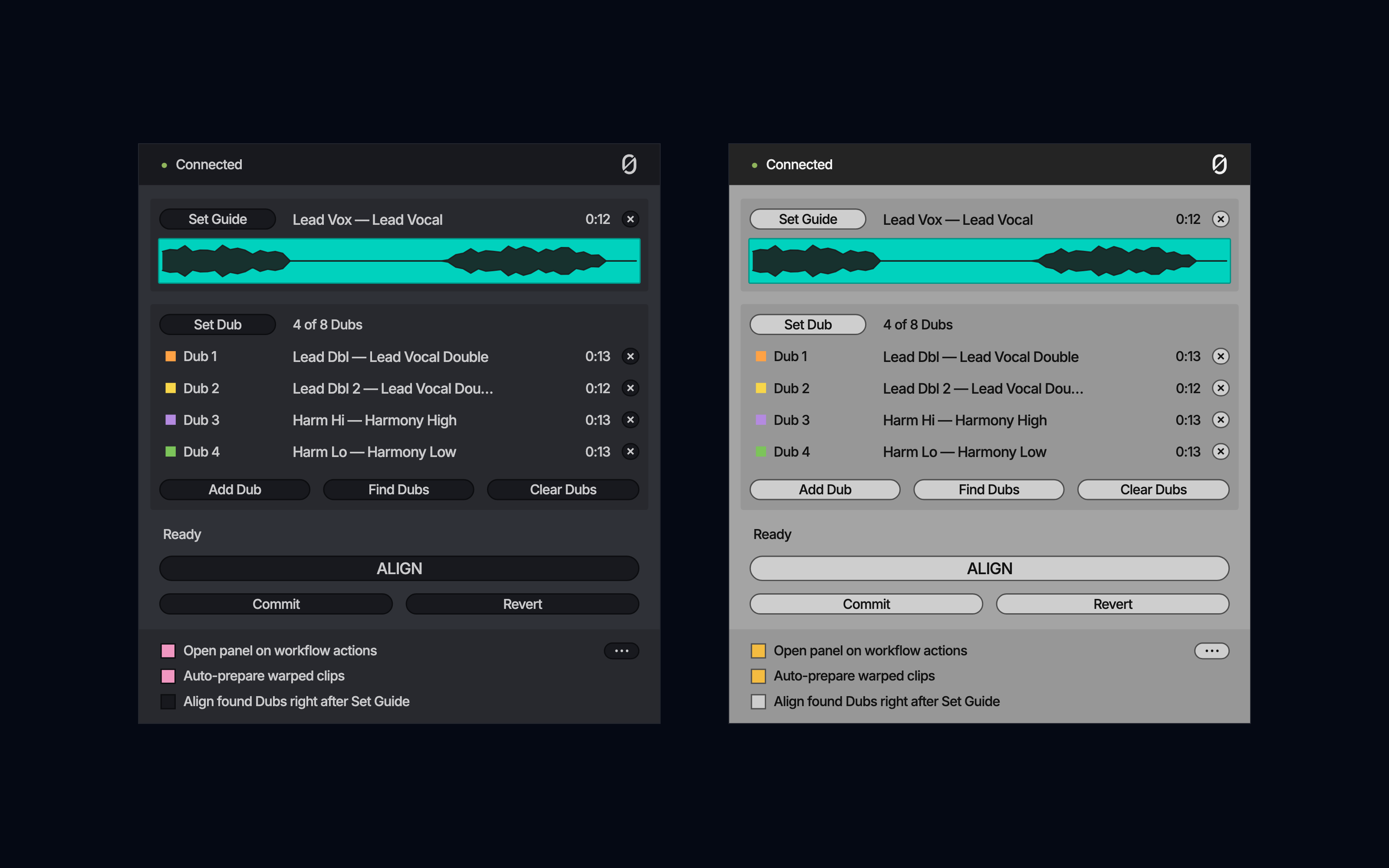
Yes. The null.audio device and the ALIGN and EDIT panels take their colours from Live, so they look at home in Live's light and dark themes, and change with them.

The ALIGN panel with four Dubs, in Live's Dark theme on the left and its Light theme on the right.

What will I need to run ALIGN?

Ableton Live 12.3 or later (Live 12 Suite, or Live 12 Standard with the Max for Live add-on), macOS 14 or later or Windows 11, and your own VocAlign: VocAlign 7 Pro or Standard, or VocAlign 6 Pro, and on macOS also VocAlign 6 Standard. ALIGN does not include VocAlign and does nothing without it.

With every one of them, Standard included, ALIGN aligns up to eight Dubs against one Guide at once.

The exact versions we test with are under tested setups. A newer VocAlign version should work too; the null.audio app marks it "Not yet tested". The refund policy covers you if ALIGN does not work as advertised on a tested setup.

Do I need Ableton Live Suite?

You need Max for Live, because the null.audio device is a Max for Live device. Max for Live comes with Live 12 Suite. With Live 12 Standard you can add it by buying Ableton's Max for Live add-on. Live Intro and Live Lite can't run Max for Live devices.

Whichever edition you have, it needs to be Live 12.3 or later. On an older Live the null.audio device says so and doesn't start.

What does it cost?

ALIGN is €39 once, EDIT is €49 once, and ALIGN + EDIT is €69 once, €19 less than buying both. No subscription. Prices include VAT. You buy through Lemon Squeezy, which shows the tax amount at checkout.

For the first two weeks after launch there is an introductory price: €29 for ALIGN, €39 for EDIT and €55 for ALIGN + EDIT. Checkout charges it directly; there is no code to enter.

Will there be refunds?

Yes. We plan a 14-day compatibility refund. Email contact@null.audio within 14 days of purchase, tell us what happened and what you are running, and let us make one reasonable support attempt.

If the product still does not work as advertised on a supported or tested setup, we will refund the purchase in full and deactivate the licence. The voluntary policy does not promise compatibility with unsupported setups. Statutory consumer rights are unaffected.

Can I use Melodyne in Ableton Live?

Yes. EDIT opens a selected clip in Melodyne from Ableton Live, plays your edit in the Live mix in real time, and Commits the finished audio back to Arrangement View. You need your own Melodyne licence.

EDIT also works with SpectraLayers, RePitch, Vovious and NoiseWorks VoiceAssist. See null.audio EDIT.

Read every question on the support page

null.audio ALIGN

Align vocals in Live, without the capture pass.

Introductory price €29 until 8 November 2026, then €39, incl. VAT. No subscription, no account. Your licence key works on two computers.

macOS and Windows · Ableton Live 12.3 or later · needs VocAlign Pro or Standard. Available now.

Refunds and support
14-day compatibility refund after one support attempt. Statutory rights are unaffected. Email contact@null.audio Expect a reply within 48 hours.
Updates
Included. null.audio checks once a day and tells you when one is ready.
Want EDIT too?
ALIGN + EDIT with one licence key: Introductory price €55 until 8 November 2026, then €69, incl. VAT.
Buy ALIGN + EDITCompare