For Ableton Live · macOS and Windows · Version 1.2

ARA plug-ins in Ableton Live, right from the Arrangement.

null.audio EDIT opens a clip, a whole verse with its doubles or a whole track in Melodyne or another ARA editor, and you hear every edit in your mix. For VocAlign there's ALIGN.

€49Once, incl. VAT.

Want both? ALIGN + EDIT for €69 saves €19.

Available now. Tested setups.

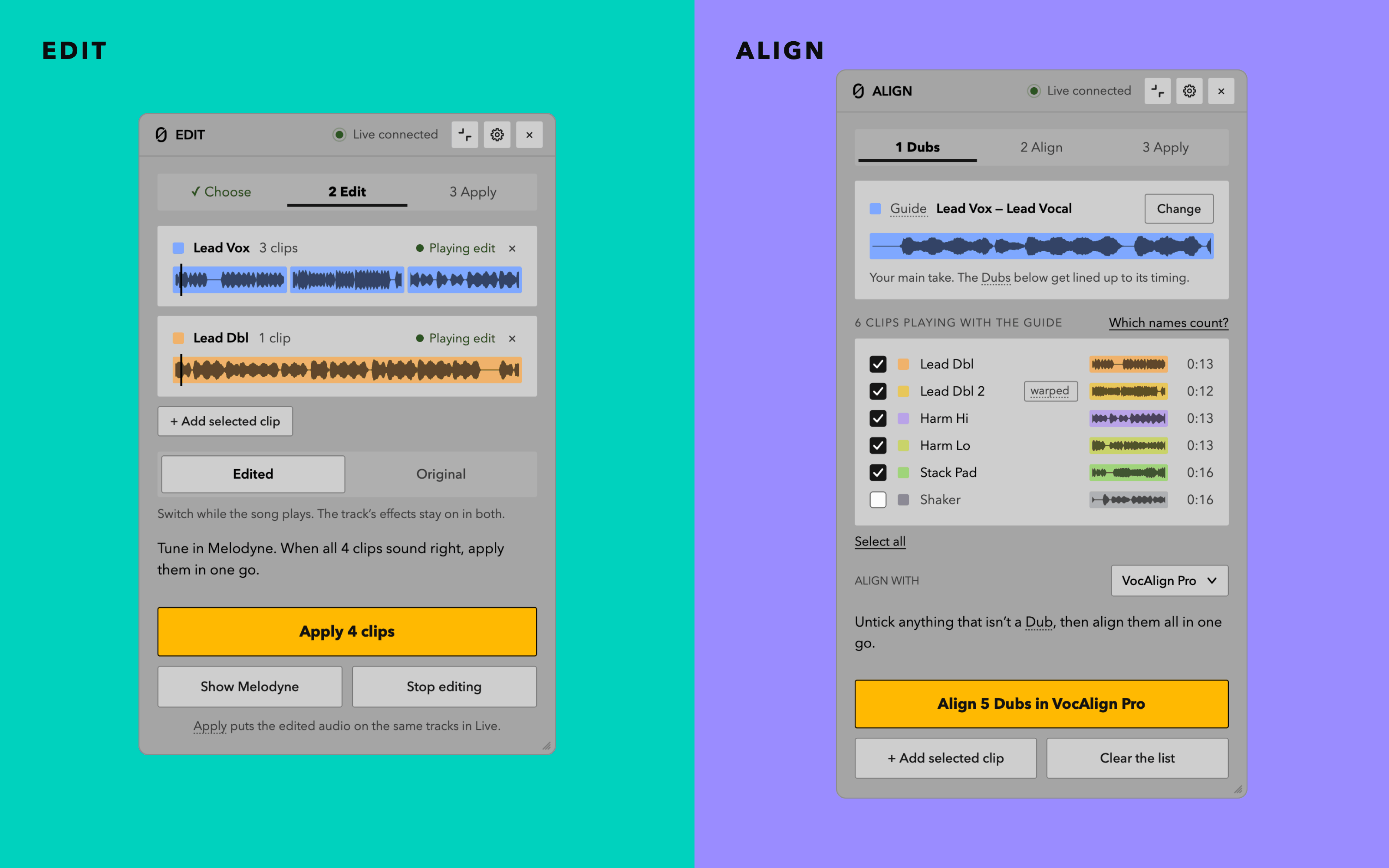
The EDIT panel while four clips play their edit in Live, next to the ALIGN panel with five Dubs ticked under the Guide.

EDIT and ALIGN in 40 seconds

The problem

A vocal in Live is never just one clip.

A finished verse is a comp of several takes, with doubles and harmonies on other tracks, and often warped. Tuning and aligning all of it takes far more steps than it should.

Live 13 and ARA: what null.audio adds · Every way to use ARA plug-ins in Live

Editing in Live today

Edit away from the mix.

Melodyne as a normal plug-in has to record the clip first, in real time: a three-minute vocal takes three minutes, and again after every new take. Or you export the clip to another DAW, edit it away from your song and bring it back.
Aligning in Live today

Every take has to be played in first.

Put VocAlign on the tracks and play every take into it in real time (with VocAlign 6, through a sidechain too). To print only the aligned Dub without its vocal chain, move it to a clean track, render it and move it back. Every new take means doing it again.

What null.audio adds to ARA

null.audio finds the clips and adds them in one click.

ARA puts an editor on a clip. In a DAW with ARA built in, you still add Melodyne or VocAlign to each clip yourself: the comped verse, then every double on its own track. null.audio starts from the one clip you click and finds the rest by itself.

  • Doubles found by name

    Click your lead vocal and the panel lists the doubles and harmonies playing with it, ticked by their track names: Dbl, Harm, BGV, Adlib and more. Select all adds every one of them in one click.

  • The whole stack in one go

    EDIT opens a comped verse with its doubles in one Melodyne edit. ALIGN opens VocAlign with up to eight Dubs already in it.

  • One click to apply them all

    Apply puts every clip back on its own track, and each vocal chain stays where it is. In EDIT, one switch compares every track with the original while the song plays.

How EDIT comparesHow ALIGN compares

From the builder

Why I built it.

I wanted ARA in Ableton so badly. Update after update, I hoped Live would add it. Instead, I kept switching to Cubase for vocal production because Cubase supports ARA2, even though Ableton was where I felt most creative and comfortable. Recording every take into VocAlign or Melodyne in real time was a creative killer. So was rebuilding a clean track just to render an edit.

What I wanted fits in one sentence. Click a clip in the Arrangement, edit it in Melodyne or align it in VocAlign, hear it in the song, and put it back. No playing the part in first, no printing my vocal chain into the audio, no moving clips to a clean track just to bounce them.

That's what null.audio does. And the site only says something works once I've tested it, with real songs, on macOS and on Windows.

The whole story

The fix

Select a clip in Live and press one button.

A small app does the ARA part in the background. Most of the time you won't look at it.

  1. Step 1

    Add the device

    Put the null.audio device on your Master track. It opens the EDIT and ALIGN panels. For EDIT, put the EDIT Bridge first on each vocal track.

  2. Step 2

    Choose

    Click a clip in the Arrangement. The panel shows what it found and the one button to press next.

  3. Step 3

    Work and Apply

    Work in your editor or VocAlign, then press Apply. Only those clips change.

EDIT, from one clip to Applied. ALIGN works the same way with VocAlign.

Two products

EDIT for Melodyne and more. ALIGN for VocAlign.

EDIT changes the vocal itself: its notes, pitch and timing. ALIGN lines up your doubles and harmonies to the lead. They work with different plug-ins, so you buy the one you'll use, or both with one licence key.

EDIT · Melodyne and ARA editors in Live

Hear every edit in the mix.

  • Open one clip, a whole verse with its doubles, or the whole track, in one go.
  • Every edit plays in the Live mix, through each track's own effects.
  • Switch between Edited and Original while the song plays.
  • With Live stopped, click a note in Melodyne, Vovious or RePitch and hear it.
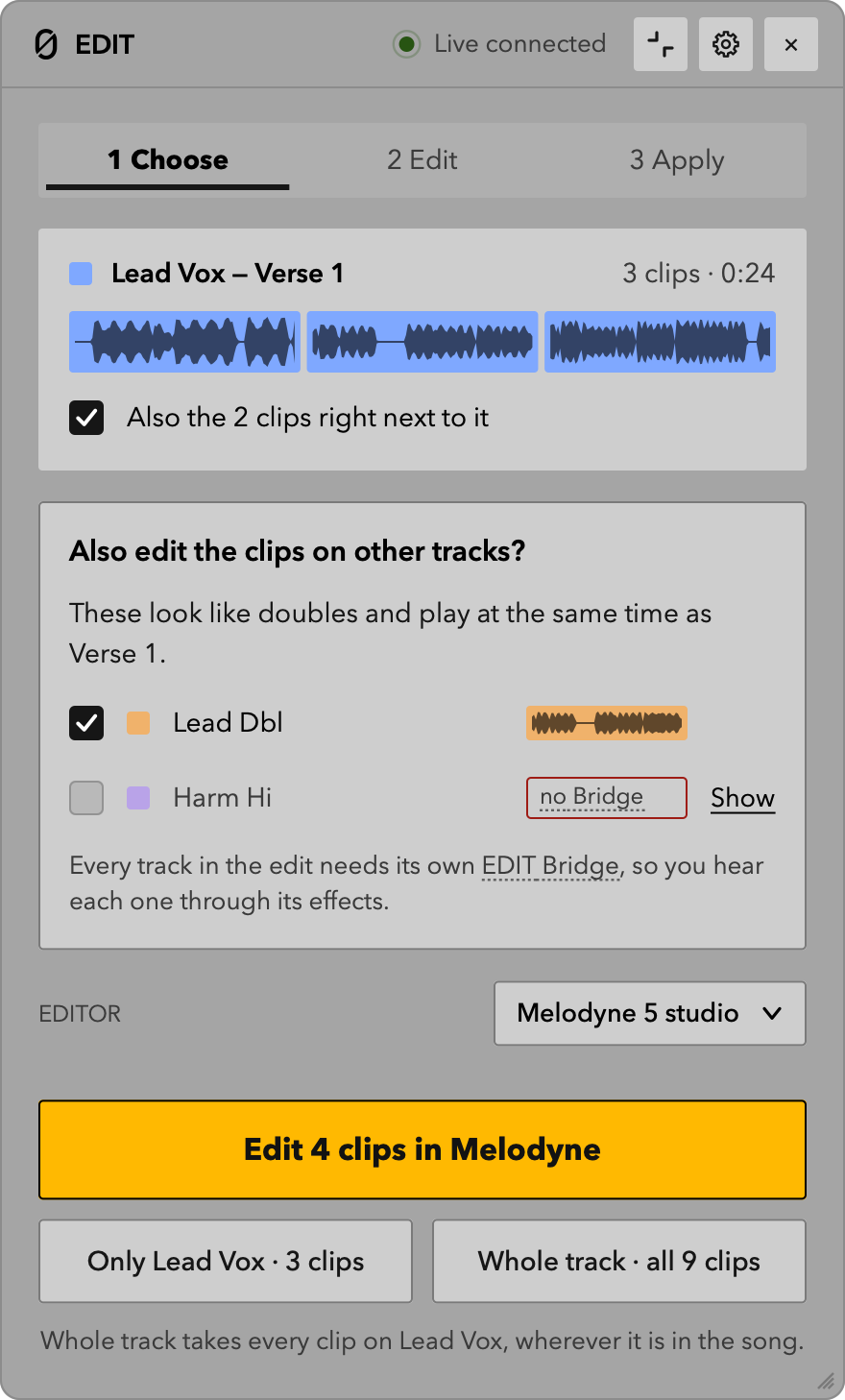
The EDIT panel on Choose: three clips of Verse 1 on Lead Vox, a double ticked, and Edit 4 clips in Melodyne.

€49 once, incl. VAT. Needs Melodyne, SpectraLayers, RePitch, Vovious or VoiceAssist.

Buy EDIT · €49See EDIT

ALIGN · VocAlign in Live

Align without playing every take in.

  • Set your main vocal as the Guide, and up to eight Dubs are found by their track names.
  • VocAlign opens with all of them already in it. Nothing to route, nothing to play in.
  • Or align with Built-in (beta), with no plug-in, up to four Dubs at once.
  • Apply puts back only the aligned Dubs. Revert one, or all of them.
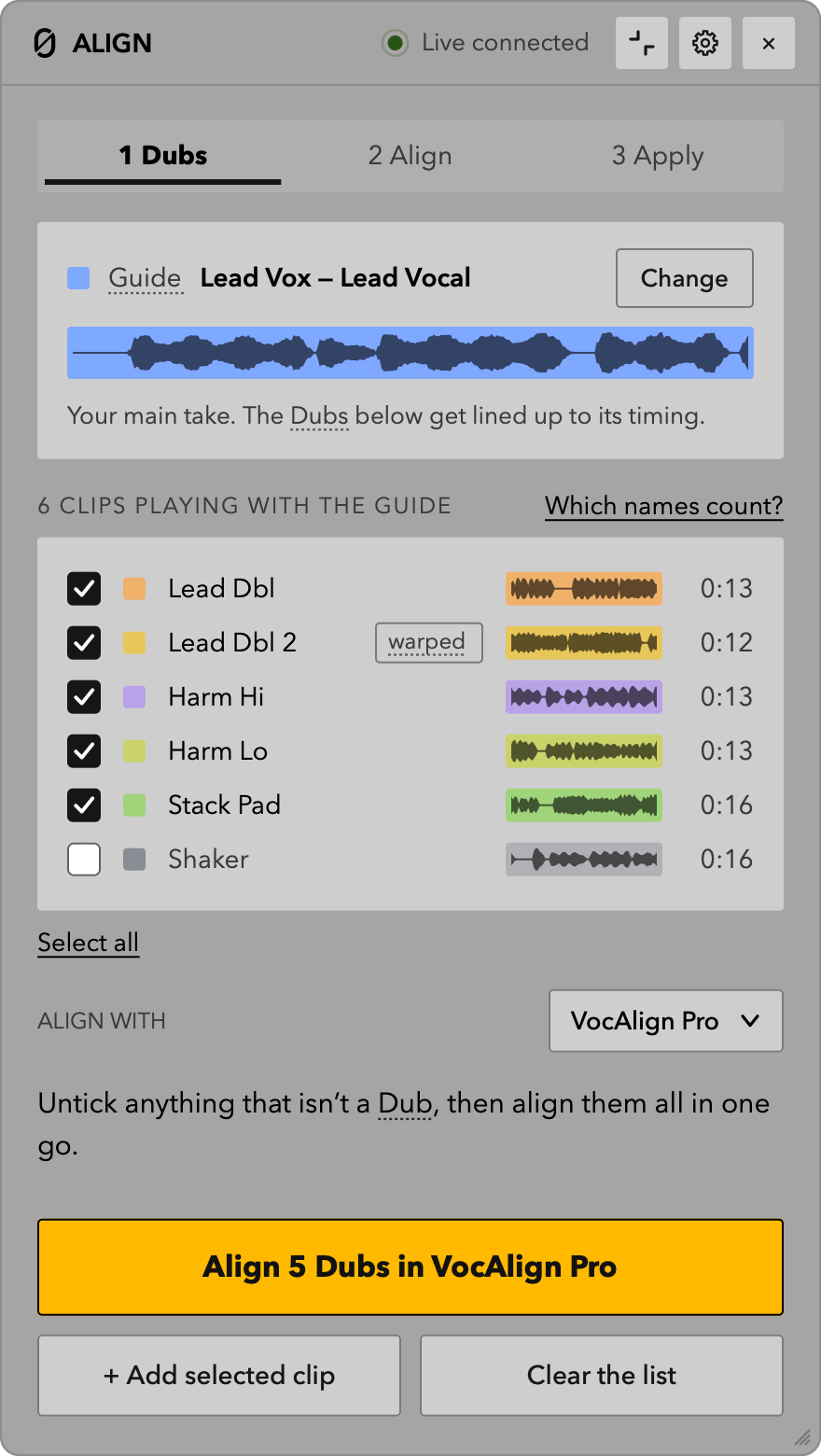
The ALIGN panel with the Guide and five Dubs ticked, ready to align.

€39 once, incl. VAT. Works with VocAlign Pro or Standard, or Built-in (beta) with no plug-in.

Buy ALIGN · €39See ALIGN

The step-up: ALIGN + EDIT, both with one licence key. €69 once, incl. VAT. Compare

Buy ALIGN + EDIT · €69

Safe for your sessions

What you can count on.

  • Your vocal chain stays intact

    Apply puts back only the edited audio, in the same place on the same track. Your plug-ins stay where they are, so there's nothing to bounce.

  • Your original stays safe

    Nothing changes until you press Apply, and Revert puts the clips back. New audio goes into your Project folder, and null.audio never deletes files.

  • Warped clips work too

    Stretched clips open in Melodyne and Vovious with no Consolidate. Other editors, and transposed clips, are prepared for you with Live's own Consolidate, and your clip goes back as it was.

  • A small app, out of the way

    One installer sets up a device on your Master track, the EDIT Bridge and a small app in the menu bar. While it waits, the app uses well under 1% of one CPU core.

  • Tested before it says so here

    Every editor and VocAlign version on the support page is tested on macOS and on Windows. The installers are signed, and on macOS notarized by Apple.

  • Pay once, no subscription

    No account needed. 1.1 and 1.2 were free updates for everyone who already had it. Your licence works on two computers, and offline after activation.

Tested setupsHow to install

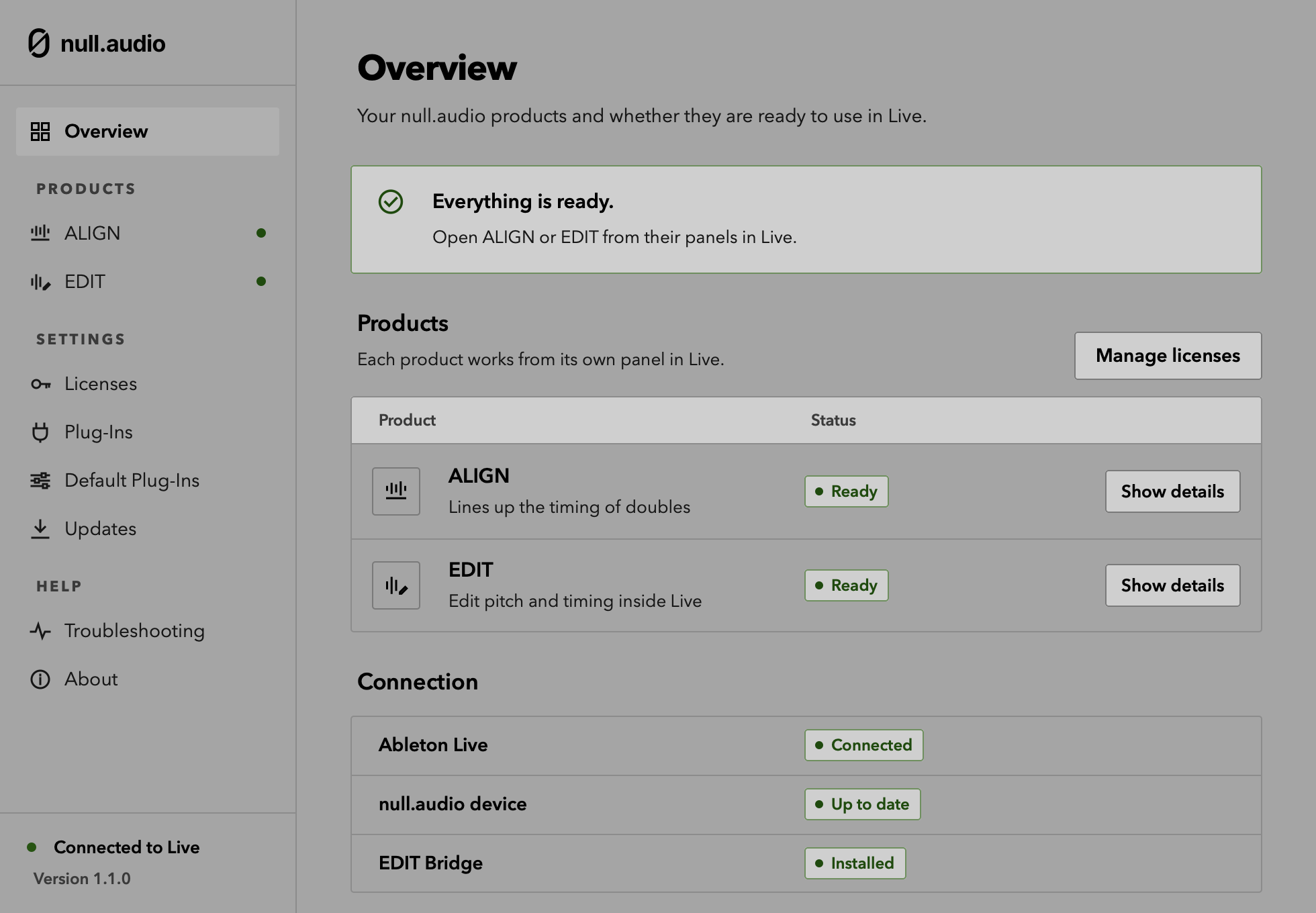
The null.audio app's Overview page: everything is ready, ALIGN and EDIT both ready, and Ableton Live, the null.audio device and the EDIT Bridge connected.
The null.audio app, open on its Overview page. You can ignore it most of the time.

Questions

ARA, Melodyne and VocAlign in Ableton.

Does Ableton Live support ARA?

Not in Live 12. Live 13 will, from early 2027 (what Ableton has announced). Ableton Live 12 doesn't host ARA plug-ins, so Melodyne and VocAlign can't read your clips directly the way they do in Cubase, Studio One or REAPER. null.audio runs an ARA host next to Live and connects it to your Arrangement clips. ALIGN brings VocAlign into Ableton, EDIT brings Melodyne, SpectraLayers, RePitch, Vovious and VoiceAssist. More on ARA in Ableton Live.

Can I use Melodyne in Ableton Live?

Yes. EDIT opens a selected clip in Melodyne from Ableton Live, plays your edit in the Live mix in real time, and Apply puts the finished audio back in Arrangement View. A whole verse, your doubles on other tracks or a whole track open in one Melodyne session. You need your own Melodyne licence.

EDIT also works with SpectraLayers, RePitch, Vovious and NoiseWorks VoiceAssist. See null.audio EDIT.

How do I use VocAlign in Ableton Live without realtime capture?

With ALIGN. Select your main vocal in Live and press Set Guide. ALIGN lists the Dubs that play with it, the doubles and harmonies on other tracks, and ticks them for you. Press Align, and VocAlign Pro or Standard opens with all of them already in it, so there is nothing to route and nothing to play in. When it sounds right, press Apply: only the aligned Dubs go back, each on its own track.

You can align up to eight Dubs against the same Guide, with any VocAlign ALIGN works with, Standard included. Or add each Dub yourself with + Add selected clip.

Do I need an ARA plug-in for null.audio?

For EDIT, yes. null.audio connects Ableton Live to ARA plug-ins you already own. ALIGN works with VocAlign Pro or Standard, or with Built-in, a beta since 1.1 that aligns without a plug-in. EDIT needs an ARA editor such as Melodyne, SpectraLayers, RePitch, Vovious or NoiseWorks VoiceAssist. Neither is included.

More questions and answers

Get an email when a new version or a new product is out.

Do the vocal work in Live.

One-time prices: EDIT €49, ALIGN €39, ALIGN + EDIT €69. Prices include VAT. Available now.

Pay once, no subscription. 1.1 and 1.2 were free updates for everyone who already had it. Each licence works on two computers.