null.audio ALIGN · macOS and Windows · Version 1.2

VocAlign in Ableton Live with ARA, no capture pass.

Select your main vocal and ALIGN finds up to eight Dubs playing with it: your doubles, harmonies and ad-libs. VocAlign Pro or Standard opens with all of them already in it. There's nothing to route and nothing to play in.

Want both? ALIGN + EDIT for €69 saves €19.

€39 once, incl. VAT. macOS and Windows · Ableton Live 12.3 or later · VocAlign Pro or Standard, or Built-in (beta). Available now. Tested setups.

Before and after

Your doubles in VocAlign, with nothing to play in.

null.audio runs an ARA host in the background and connects it to your clips in Live.

Before ALIGN

Every take has to be played in first.

  1. Put VocAlign on the vocal tracks. With VocAlign 6, also route the Guide to its sidechain.
  2. Play the section through so VocAlign can record the Guide and Dubs in real time.
  3. To avoid rendering the full vocal chain, move the Dub to a clean track first, render it, then move the result back to the real vocal track.

Every new take or revision means doing this again.
With ALIGN

Nothing to route or play in.

  1. Select your main vocal and press Set Guide.
  2. Check the Dubs ALIGN found by their track names.
  3. Press Align. VocAlign opens with every Dub already in it.
  4. Press Apply. Only the Dub clips are replaced in Arrangement View, and your vocal chain stays intact.

Why ALIGN

Fewer steps than doing it by hand, even in a DAW with ARA.

Up to eight Dubs at once, found for you.

Press Set Guide and ALIGN lists the takes playing with your main vocal. It ticks the ones on tracks with names like Dbl, Double, Harm, BGV, Adlib, Stack or Vox. Up to eight go into VocAlign together.

Untick what isn't a Dub, or use Select all and Deselect all. Add any other clip with Add selected clip. Turn on Align found Dubs straight away, and one press on Set Guide does all of it.

Works with VocAlign 7 Pro and Standard, VocAlign 6 Pro, and on macOS VocAlign 6 Standard. How several Dubs work

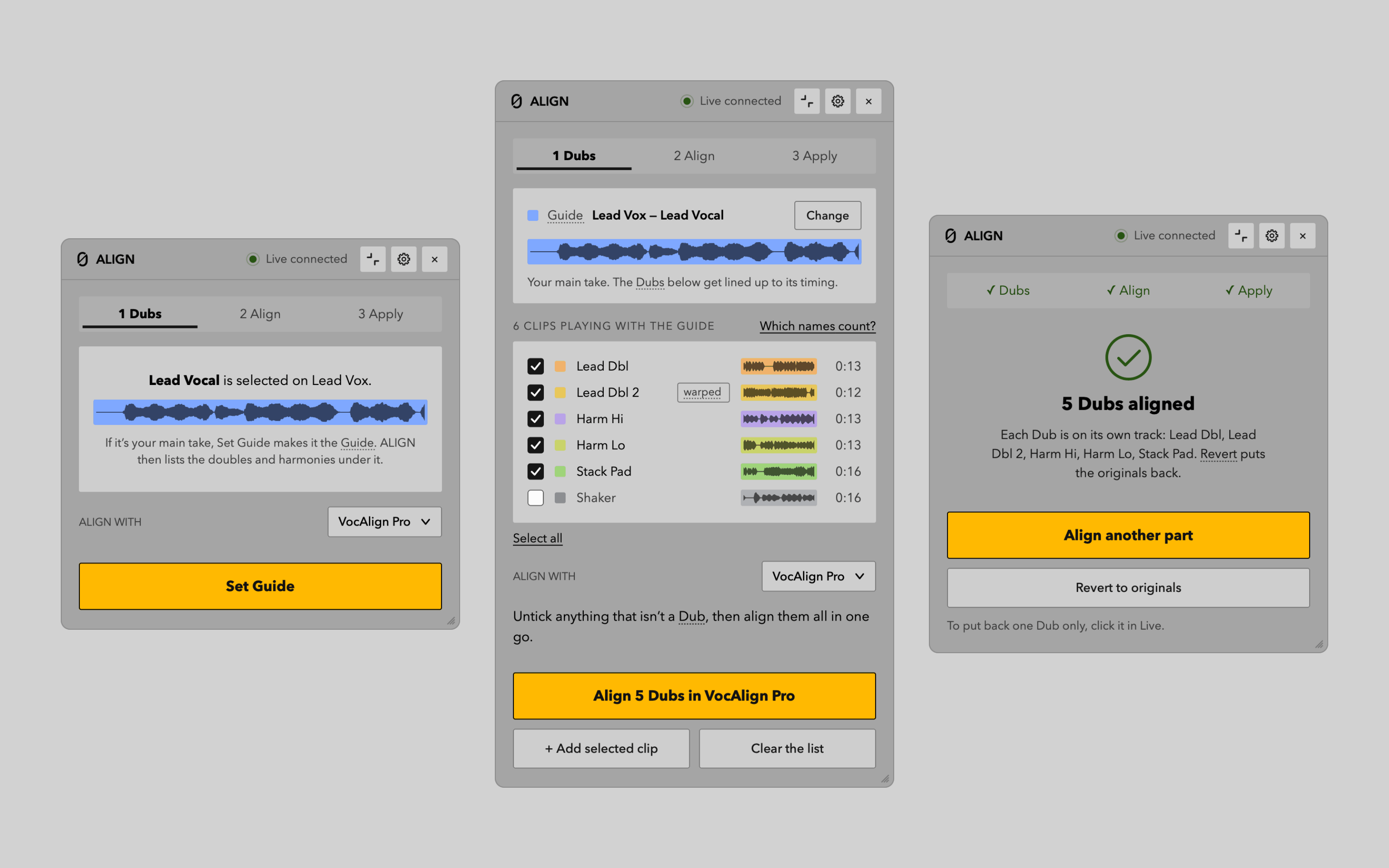
Three ALIGN panels: Lead Vocal selected with Set Guide, then the Dubs found under it with Align 5 Dubs in VocAlign Pro, then 5 Dubs aligned, each on its own track.
Set Guide, check the Dubs, Align and Apply.
  • Straight into VocAlign

    Set the Guide and check the Dubs once on the ALIGN panel. VocAlign opens with all of them already in it. You don't set anything again in VocAlign, and you don't play the section through.

  • Your vocal chain stays intact

    Apply replaces only the Dub clips. Your EQ, compression and effects stay on the track as they are. Nothing is rendered through them, and you don't need a clean track.

  • Non-destructive

    Apply writes new files and never deletes your takes. Revert to originals puts every Dub back as it was, and Revert Dub puts back only the one selected in Live. Your audio stays on your computer.

ALIGN can prepare stretched clips for you, and every button can go on a key or a MIDI control. The panel scales when you drag its corner. Apply waits until VocAlign has finished lining up your Dubs. The null.audio app sits in the menu bar (the system tray on Windows).

Beta

Built-in: align without a plug-in.

Built-in lines up your Dubs inside null.audio, right in the ALIGN panel, with no plug-in. It's quick, because no plug-in window has to open. It comes with ALIGN, too.

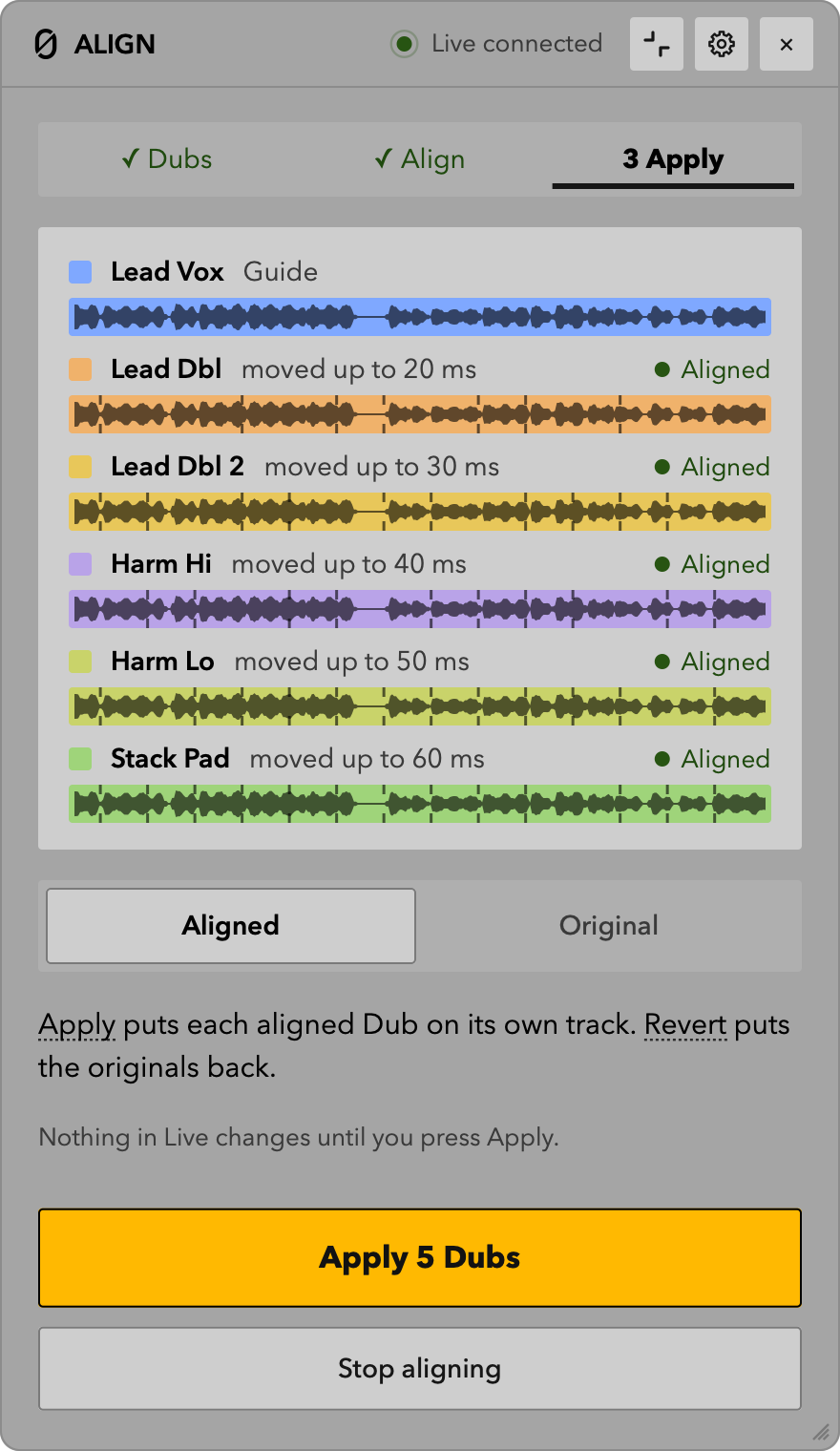
Pick it under Align with. It lines up to four Dubs at once, depending on how many cores your computer has, each with its own progress bar. Then every Dub shows how far it moved. If Built-in can't line one up well enough, it leaves it as it was and says so. Aligned and Original show each Dub's waveform before and after, under the Guide's.

It doesn't line up as well as VocAlign yet. For everyday doubles it may be enough. It's a beta, and it lines up at most eight minutes at a time. VocAlign stays fully supported. Roadmap

The price goes up after the beta.

I priced ALIGN for people who already own VocAlign. Once Built-in is out of beta, ALIGN can align on its own, without VocAlign. Then its price goes up. If you buy ALIGN before that, you pay today's price, and Built-in comes with it.

The ALIGN panel after Built-in lined up five Dubs: Lead Vox as the Guide, each Dub with its waveform, how far it moved and Aligned, the Aligned and Original switch, and the button Apply 5 Dubs.

The ALIGN panel

See everything it does.

The panel shows the step you're on and the one button to press next. When something needs you, it says what happened and how to sort it out.

ALIGN in 35 seconds.
  • Which names count?

    See which track names ALIGN ticks by itself. To change what it ticks, rename the track in Live.

  • Stretched Dubs

    A clip that Warp stretches is added on its own, so null.audio can prepare it first.

  • Revert to originals

    Put the original Dubs back, then align again or start over with a new Guide.

  • Your settings

    When the panel shows, Guided or Short explanations, and how ALIGN finds your Dubs.

Align your next stack in Live.

If Ableton is your main DAW

Three ways to align a vocal double.

The usual workaround is to export the clips to a DAW with ARA, align them there and bring them back. That's the third column.

Scroll sideways to see the full table.

Three ways to align a vocal double when Ableton is the main DAW
VocAlign in LiveALIGN in LiveExport from Ableton to a DAW with ARA
Starting pointPut VocAlign on the tracks (VocAlign 6: route the Guide to its sidechain)Select your main vocal in LiveExport clips from Ableton
Realtime captureCapture Guide and Dub together while the section playsWorks from the selected clipsThe other DAW reads the export
Work from clipsOnly after realtime captureDirectly from the Guide and DubsAfter export
Several doubles at onceRecorded in realtime; VocAlign 7 records a stack in one passUp to 8 Dubs in one pass, found by track nameDepends on the other DAW
Steps per alignmentInsert, record the takes in realtime, set Guide and Dubs in VocAlign, align, printSet Guide, Align, ApplyExport from Ableton, align in the other DAW, export, import, re-position
Aligned audio in Arrangement ViewRender the full vocal chain, or prepare a clean track first and move the rendered clip backApply replaces only the Dub clips while their vocal chains stay intactImport and place it yourself
Needs your own VocAlign Pro or Standard licenceYesYes, or Built-in (beta) with no plug-inYes

Next to ARA in a DAW

ALIGN finds the Dubs for you.

In a DAW with ARA built in, you still add VocAlign to the Guide and to each Dub yourself, and tell it which one is the Guide.

ALIGN starts from your main vocal. It lists the clips that play with it and ticks the doubles and harmonies by their track names. VocAlign opens with the Guide and every Dub already in place. One Apply puts every aligned Dub back on its own track, and each vocal chain stays where it is. With Built-in, you don't need VocAlign at all.

ARA is a technology of Celemony and PreSonus. VocAlign is a trademark of Synchro Arts Limited. null.audio is not affiliated with any of them.

Requirements

What you need.

ALIGN works with VocAlign 7 Pro or Standard and VocAlign 6 Pro, and on macOS also VocAlign 6 Standard. Bring your own installation and licence.

System requirements

Ableton Live
Live 12.3 or later: Live 12 Suite, or Live 12 Standard with the Max for Live add-on. Older versions of Live are not supported
macOS
macOS 14 or later. Tested on Apple Silicon; Intel Macs untested
Windows
Windows 11, 64-bit. Windows 10 22H2 installs after a warning, and is untested
Plug-in format
VST3 for your ARA editor and VocAlign. The EDIT Bridge is a VST3, and on macOS also an Audio Unit

Scope

Live view
Arrangement View only
Per alignment
One Guide and up to 8 Dubs
Installs
null.audio.amxd plus the null.audio app
Requires
Your own VocAlign Pro or VocAlign Standard, or the included Built-in (beta)

The exact versions I test with are on the support page.

ALIGN and EDIT

Why ALIGN and EDIT are separate.

ALIGN lines up the timing of your doubles to your main vocal, with VocAlign or with Built-in. EDIT opens your clips in an ARA editor, such as Melodyne, where you change pitch, timing or sound.

They work with different plug-ins. You might own VocAlign and not Melodyne, or the other way round, so you only buy the one you'll use. Both come with the same installer, app and device, and they can run at the same time on different clips. ALIGN + EDIT unlocks both with one licence key.

See EDIT · Compare the products

Want to hear when Built-in leaves the beta? I'll send an email.

Questions about ALIGN

Before you buy.

Does Ableton Live support ARA?

Not in Live 12. Live 13 will, from early 2027 (what Ableton has announced). Ableton Live 12 doesn't host ARA plug-ins, so Melodyne and VocAlign can't read your clips directly the way they do in Cubase, Studio One or REAPER. null.audio runs an ARA host next to Live and connects it to your Arrangement clips. ALIGN brings VocAlign into Ableton, EDIT brings Melodyne, SpectraLayers, RePitch, Vovious and VoiceAssist. More on ARA in Ableton Live.

Do I need an ARA plug-in for null.audio?

For EDIT, yes. null.audio connects Ableton Live to ARA plug-ins you already own. ALIGN works with VocAlign Pro or Standard, or with Built-in, a beta since 1.1 that aligns without a plug-in. EDIT needs an ARA editor such as Melodyne, SpectraLayers, RePitch, Vovious or NoiseWorks VoiceAssist. Neither is included.

Can ALIGN find my doubles by itself?

Yes. Right after Set Guide, the ALIGN panel lists the clips that play with the Guide on other tracks and ticks the ones on vocal tracks, by their track names: Vox, Vocal, Lead, Double, Dbl, Harm, BGV, Adlib, Stack and more. Untick anything that isn't a Dub. Which names count? on the panel lists every name.

To skip even that look, turn on Align found Dubs straight away in the panel's settings: one press on Set Guide opens VocAlign with every Dub that would be ticked. Nothing in Live changes until you press Apply. See Check the Dubs.

Can ALIGN align without VocAlign?

Yes, since 1.1, with Built-in. It lines up your Dubs inside null.audio, right in the ALIGN panel, with no plug-in, up to four at once, and it comes with ALIGN. It doesn't line up as well as VocAlign yet, but it's quick and may be enough for everyday doubles. It's a beta, and it lines up at most eight minutes at a time. VocAlign stays fully supported.

Do I need VocAlign Pro to align several Dubs?

No. ALIGN aligns up to eight Dubs against one Guide with every VocAlign it works with: VocAlign 7 Pro or Standard, VocAlign 6 Pro, and on macOS also VocAlign 6 Standard. The ALIGN panel lists the Dubs playing with the Guide and ticks the vocal takes, VocAlign opens with all of them, and one Apply puts every aligned Dub back on its own track. See Check the Dubs.

I recorded a new take. How do I align it, or align a Dub again?

A new take: select your main vocal in Live and press Set Guide. ALIGN lists the clips playing with it again, so the new take is in the list. Untick the Dubs you have already aligned, then press Align.

The same Dubs again: right after Apply, the ALIGN panel offers Revert to originals. That puts the original Dubs back, and Align again opens them in VocAlign once more. If you only want to change the alignment before you apply it, change it in VocAlign. Nothing in Live changes until you press Apply.

To start on a different part instead, press Align another part.

What happens if I move or change a clip while I edit or align it?

Your audio is safe either way. null.audio checks that every clip is still where it was before it changes anything in Live.

EDIT: if you move one of the clips you're editing, the EDIT panel says which one. Move it back, or take it out of the edit and carry on with the others.

ALIGN: if you move a Dub after adding it, Apply changes nothing and tells you which clip changed. Add that Dub again, then press Apply.

Can I use warped clips?

Yes. Clips with Warp on that play at your Set's tempo open as they are. Since 1.2, a clip that Warp stretches opens in Melodyne or Vovious with no Consolidate. Your editor gets your original recording and follows Live's Warp markers. With Melodyne, Apply keeps the markers when no note moved in time. With Vovious, an edited clip comes back with Warp off, because Vovious moves the audio a little when it edits.

Other editors, ALIGN and a few kinds of clip still use Live's Consolidate. Consolidate clips for me when needed is on by default in the panel's settings (the cog). null.audio then renders a copy at your Set's tempo, so the editor hears what you hear, and puts your clip back. Each one takes a click, the applied clip comes back with Warp off, in time with the Set, and on macOS this needs the Accessibility permission. When Consolidate still happens.

What will I need to run ALIGN?

Ableton Live 12.3 or later (Live 12 Suite, or Live 12 Standard with the Max for Live add-on), macOS 14 or later or Windows 11 (Windows 10 22H2 installs after a warning, untested), and either your own VocAlign: VocAlign 7 Pro or Standard, or VocAlign 6 Pro, and on macOS also VocAlign 6 Standard. Or Built-in, the beta that comes with ALIGN since 1.1 and aligns without a plug-in. ALIGN does not include VocAlign.

With every VocAlign, Standard included, ALIGN aligns up to eight Dubs against one Guide at once.

The exact versions I test with are under tested setups. A newer VocAlign version should work too; the null.audio app marks it "Not yet tested". If it doesn't run on a tested setup, write to me and I'll help.

Do I need Ableton Live Suite?

You need Max for Live, because the null.audio device is a Max for Live device. Max for Live comes with Live 12 Suite. With Live 12 Standard you can add it by buying Ableton's Max for Live add-on. Live Intro and Live Lite can't run Max for Live devices.

Whichever edition you have, it needs to be Live 12.3 or later. On an older Live the null.audio device says so and doesn't start.

Read every question on the support page

null.audio ALIGN

Align vocals in Live, without the capture pass.

€39 once, incl. VAT.

  • ALIGN for macOS and Windows, with one licence key for two computers.
  • Built-in included: align without a plug-in. The price goes up once it leaves the beta.
  • Pay once. No subscription, no account.
  • 1.1 and 1.2 were free updates for everyone who already had it.

Want both? ALIGN + EDIT for €69 saves €19.

macOS and Windows · Ableton Live 12.3 or later · VocAlign Pro or Standard, or Built-in (beta). Available now.

Support
Email contact@null.audio. Expect a reply within 48 hours.
Writing about it?
Email me for a review licence. Images and facts are in the press kit.
Want EDIT too?
ALIGN + EDIT with one licence key: €69 once, incl. VAT.
Buy ALIGN + EDIT · €69Compare