In Ableton Live, VocAlign works as a normal plug-in, so it has to capture the Guide and the Dub in real time before it can align anything. VocAlign 7 does that without the sidechain setup VocAlign 6 needs, but in Live it still records the takes as they play. null.audio ALIGN starts from the clips in your Arrangement instead. It lists up to eight Dubs playing with your main vocal, VocAlign opens with all of them in it, and one Apply puts each aligned Dub back on its own track. Capture costs nothing extra. ALIGN is a separate purchase and needs Live 12.3 or later with Max for Live. I make ALIGN.
Side by side
| VocAlign with a capture pass | null.audio ALIGN | |
|---|---|---|
| Setting up | VocAlign on each Dub track; with VocAlign 6, the Guide on its sidechain | Select your main vocal and press Set Guide |
| Finding the Dubs | You pick the tracks | ALIGN lists the clips playing with the Guide and ticks the doubles and harmonies by their track names |
| Getting the audio in | Play the section through in real time, and again after a new take | Nothing to play; VocAlign opens with the Guide and up to eight Dubs |
| Several Dubs | Shift-click Capture to capture every armed instance in one pass | Up to eight Dubs against one Guide, with every VocAlign ALIGN works with |
| Printing | Resample to a new track, or Freeze and Flatten, which prints the effects after VocAlign too | Apply puts each aligned Dub back on its own track; your vocal chain stays intact |
| Undoing it | Keep the original take until you've checked the print | Revert to originals, or Revert Dub for one Dub |
| What you need | VocAlign and any Live version Synchro Arts supports | VocAlign 7 Pro or Standard, VocAlign 6 Pro, or on macOS VocAlign 6 Standard; ALIGN; Live 12.3 or later with Max for Live; macOS 14 or later or Windows 11; works in Arrangement View |
When capture is the better choice
For one double on one phrase, the capture pass is short. Put VocAlign on the double, point it at the lead, capture eight bars and you're done. If you like to keep VocAlign running on the track, so you can change the preset later, capture does that.
Capture also works where ALIGN can't run. ALIGN needs Max for Live and Live 12.3 or later, and the VocAlign plug-in needs neither.
When ALIGN is the better choice
ALIGN is for stacks, and for vocals that keep changing. Every capture pass takes as long as the section, and you do it again after every new take or comp. On a chorus with two doubles, two harmonies and an ad-lib, VocAlign 6 needs five instances, each with the lead on its sidechain, before the first pass.
With ALIGN, you select the lead and press Set Guide. The panel lists what plays with it and ticks the Dubs by their track names: Dbl, Double, Harm, BGV, Adlib, Stack, Vox and more. Untick what isn't a Dub, press Align, and VocAlign opens with all of them.
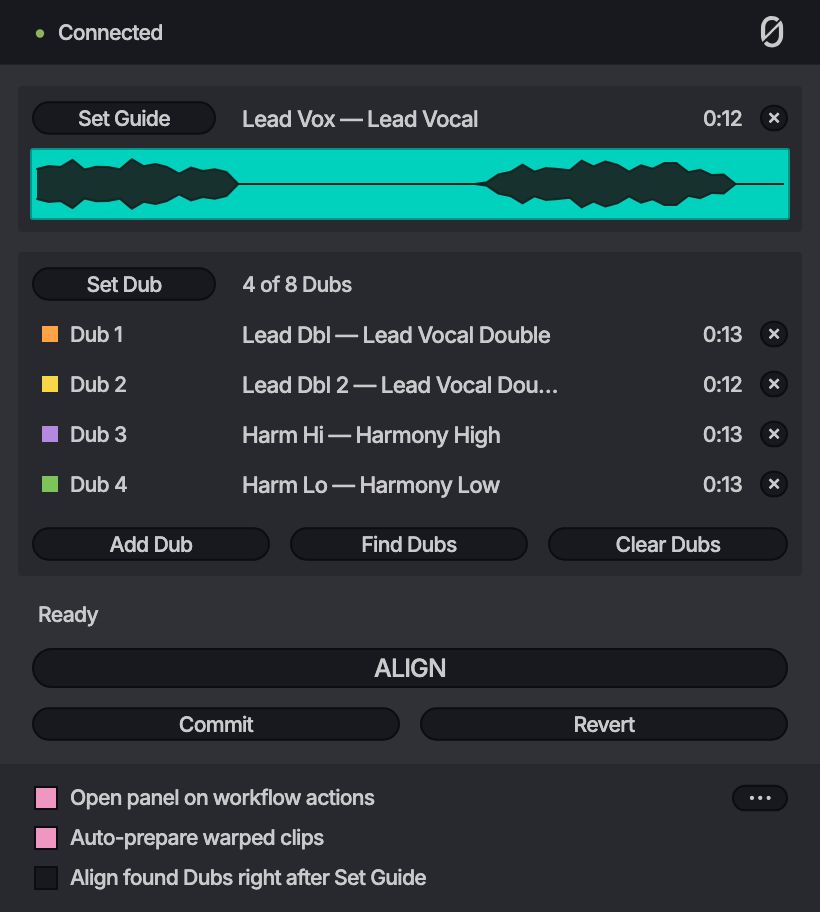
Printing is the other difference. With the plug-in, freezing and flattening the Dub track prints everything after VocAlign too, so to keep your vocal chain on the track you move the Dub to a clean track, render it and move it back. Apply writes only the aligned Dubs back, each on its own track, and the vocal chain stays on the track.
Aligning without VocAlign
Since 1.1, ALIGN can also line up Dubs without a plug-in, with Built-in. It works inside null.audio, right in the ALIGN panel, up to four Dubs at once, and it comes with ALIGN. It doesn't line up as well as VocAlign yet, but it's quick and may be enough for everyday doubles. It's a beta, and it lines up at most eight minutes at a time. VocAlign stays fully supported.
More
The capture route is step by step in How to use VocAlign in Ableton Live, and what to align to in How to align vocal doubles in Ableton Live and How to align backing vocals and harmonies in Ableton Live. The background is in ARA in Ableton Live. The VocAlign versions I test ALIGN with are under tested setups.
Sources
Primary documentation used for the technical details in this article.
- 01Quick Start Guide for VST3 Real-time (opens in a new tab)Synchro Arts (VocAlign 6 Pro manual)
- 02Getting Started with VocAlign in Ableton (opens in a new tab)Synchro Arts
- 03VocAlign Ultra QuickStart for DAWs using VST3 plugins (opens in a new tab)Synchro Arts
I make null.audio. I checked what this page says about other products against their makers' own pages on 2 November 2026. If something has changed, email me at contact@null.audio and I'll correct it. Product names are trademarks of their owners. null.audio is not affiliated with, endorsed by or sponsored by Ableton, Celemony, Synchro Arts, Steinberg, Fender, PreSonus or DoublePi Technologies.