null.audio EDIT · macOS and Windows · Version 1.2

Melodyne in Ableton Live, with ARA.

Open a clip, a whole verse with its doubles, or the whole track in Melodyne or another ARA editor, straight from the Arrangement. You don't record anything in first, and you hear every edit in the Live mix while you make it.

Want both? ALIGN + EDIT for €69 saves €19.

€49 once, incl. VAT. macOS and Windows · Ableton Live 12.3 or later · needs your own ARA editor. Available now. Tested setups.

Before and after

Your ARA editor in Live, with nothing to record in.

null.audio runs an ARA host in the background and connects it to your clips in Live.

Before EDIT

The clip has to be recorded into the editor first.

  1. Put Melodyne on the track and play the clip so it can record it, or export the clip to another DAW.
  2. Keep the edit in time with Live yourself.
  3. To print only the edit, move the clip to a clean track without your vocal chain.
  4. Render it, then move the finished clip back to the real track.

Every new clip means doing this again.

With EDIT

The clip opens straight in your editor.

  1. Click the clip in Arrangement View. EDIT finds the clips next to it and your doubles.
  2. Press Edit in Melodyne and make your changes there. Other ARA editors work the same way.
  3. Press play in Live and hear every edit in the mix as you make it.
  4. Apply only the edited clips back to Arrangement View.

Why EDIT

Edit in Melodyne or another ARA editor. Hear it in your song.

Every edit, in the Live mix, as you make it.

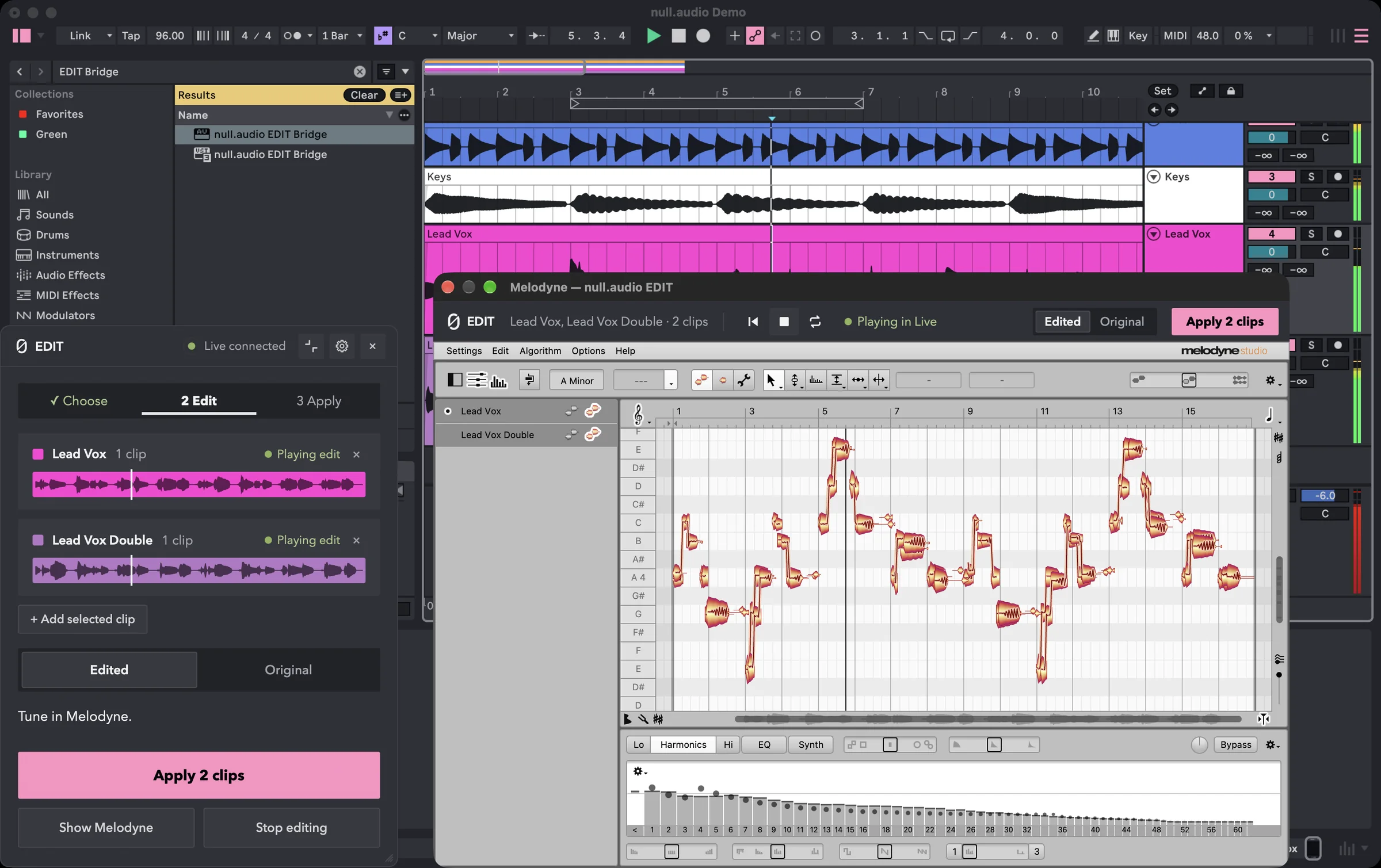
The EDIT Bridge, a small plug-in first on the track, plays your edit in Live while the editor is open. You hear every change through your whole vocal chain, against the beat and the other vocals.

No soloed clip in a separate window. Each track in the edit plays through its own effects, and the rest of your Set plays as normal.

The EDIT Bridge is a VST3. On macOS it's also an Audio Unit, so it shows up in Live even if you only use AU plug-ins.

Ableton Live with Lead Vox and Lead Vox Double open in Melodyne through null.audio EDIT. The EDIT panel shows both tracks reading Playing edit, Melodyne sits under the null.audio bar with Playing in Live, Edited and Original, and Apply 2 clips, and Live's browser lists null.audio EDIT Bridge as AU and VST3.
  • Pick your editor

    Melodyne, SpectraLayers, RePitch, Vovious or VoiceAssist. Choose one from the Editor menu on the EDIT panel. A bar above every editor lets you play, stop and loop Live.

  • Your vocal chain stays intact

    Apply renders only your edit and replaces just those clips. Your EQ, compression and effects stay on the track as they are. You don't need to bounce anything or move clips to a clean track.

  • Non-destructive

    Apply writes your edit into new files and puts them in place of the clips. Your original files stay untouched, and Revert to originals puts them back. Nothing gets deleted, and your audio stays on your computer.

Stretched clips open in Melodyne and Vovious with no Consolidate. Other editors and a few kinds of clip still take a click and Live's Consolidate. Every button on the panel can go on a key or a MIDI control. Drag the panel's corner to make it bigger or smaller, or fold it to one line. ALIGN can run on other clips at the same time.

One click, the whole part

A whole verse with its doubles, in one go.

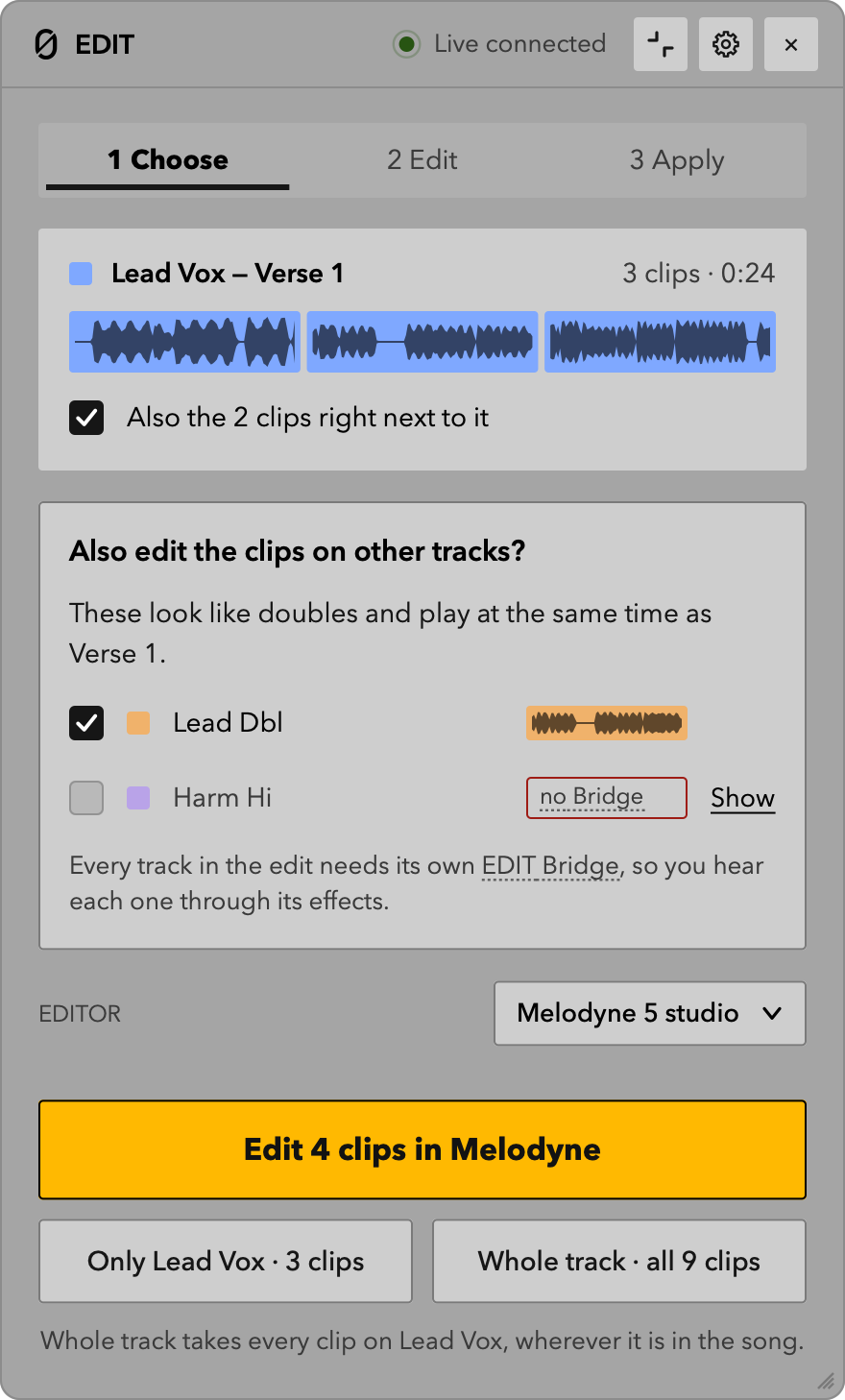
  • The clips next to it. Click one clip of a comped verse and EDIT takes the clips right next to it on the same track.
  • Your doubles. Doubles and harmonies on other tracks that play at the same time show up on the panel, found by their track names. Tick them, or press Select all, and they open in your editor together with the verse.
  • The whole track. Press Whole track and EDIT takes every clip on the track, wherever it is in the song.
  • One Apply. Every track gets its edited audio back, and each vocal chain stays on its track.
  • Change it as you go. Add a clip you forgot, take a track out, or after Apply put back just one clip. Edit next part goes straight on to the next part of the track.

Melodyne, SpectraLayers, Vovious, RePitch and NoiseWorks VoiceAssist all open several clips at once, on macOS and Windows. With VoiceAssist, the panel doesn't offer doubles on other tracks.

The EDIT panel on Choose: Lead Vox, Verse 1 with three clips, Lead Dbl ticked, Harm Hi needing the EDIT Bridge, and the button Edit 4 clips in Melodyne.

Around your editor

Play Live from your editor, and hear the notes you click.

The bar above the editor window: EDIT, Lead Vox, Verse 1, 3 clips, Back to start, Play and Loop, Live stopped, the Edited and Original switch, and a check with Applied.
The bar above your editor, right after Apply.
  • Hear a note while Live is stopped

    Click or drag a note in Melodyne, Vovious or RePitch with Live stopped, and you hear it. Each track's notes play on that track, through its own effects.

  • Live's transport above your editor

    Play, stop and loop Live from the bar, and switch between Edited and Original. Apply is on it too, and after Apply it reads Applied. The space bar plays and stops Live while your editor is in front.

  • The window stays where you put it

    Your editor's window opens where you left it last time, at the same size, on macOS and Windows.

The EDIT panel

See everything it does.

The panel shows the step you're on and the one button to press next. When something needs you, it says what happened and how to sort it out.

EDIT in 40 seconds.
  • Your doubles, in the same edit

    Clips on other tracks that play with your verse show up on the panel. Tick them and they open in your editor with the verse.

  • Whole track

    Every clip on the track, wherever it is in the song, in one go.

  • Edited or original

    Switch while the song plays. Your vocal chain stays on in both.

  • Your editor

    Pick Melodyne, SpectraLayers, RePitch, VoiceAssist or another ARA editor you added.

  • When a clip moves

    Your audio is safe. Move the clip back, or take it out of the edit and carry on with the others.

  • Revert one clip

    Select a clip in Live and put just that one back. The others keep their edit.

  • Stop editing asks first

    You won't lose changes you haven't applied by accident. Live keeps the original clips.

Hear your next Melodyne edit in the mix.

If Ableton is your main DAW

Four ways to edit a vocal in Melodyne.

As a plug-in, Melodyne has to record the clip first. As Live's sample editor, it opens the file straight away, but you can't hear your edits with the rest of the song. In a DAW with ARA, you leave your Live Set and bring the result back. EDIT opens the clip straight away and plays every edit in the Live mix.

Scroll sideways to see the full table.

Four ways to edit a vocal in Melodyne when Ableton is the main DAW
Melodyne as a plug-inMelodyne as Live's sample editorExport to a DAW with ARAEDIT in Live
Get audio into the editorPlay the clip so Melodyne can record itLive opens the clip's file in Melodyne on its ownExport the clips and open them in the other DAWClick one clip. EDIT adds the clips next to it, your doubles or the whole track
Hear edits against the mixYes, from the plug-in on the trackNo. You hear the clip on its ownOnly against what you exported with itYes, in real time in Live
Print one editBounce the whole chain or use a clean trackSave the file back from MelodyneRender it there, then import it into Live and put it in placeApply the edited clips. Each vocal chain stays on its track
Needs your own editor licenceYesYesYes, and the other DAWYes

Next to ARA in a DAW

EDIT finds the clips for you.

In a DAW with ARA built in, you add your editor to the events or tracks yourself: the comped verse, then each double on its own track.

EDIT starts from the one clip you click. It takes the clips right next to it, and it lists the doubles and harmonies that play at the same time, by their track names. Whole track takes every clip on the track. One switch compares every track in the edit with the original while the song plays. One Apply puts every clip back on its own track, and each vocal chain stays where it is.

ARA is a technology of Celemony and PreSonus. Melodyne is a trademark of Celemony Software GmbH. null.audio is not affiliated with either.

null.audio 1.2

What 1.2 does, and where its limits are.

Works now

  • Stretched clips open in Melodyne and Vovious with no Consolidate, and no click per clip.
  • Change pitch in Melodyne, and Apply hands the clip back warped, with its Warp markers.
  • Clips under tempo changes open in your editor and land at the right length.
  • EDIT adds its Bridge to the track for you.
  • With Melodyne and Vovious, only the clips you edited are applied.

Limits

  • Move a note in time in Melodyne, or edit in Vovious, and that clip comes back with Warp off.
  • SpectraLayers, RePitch, VoiceAssist and ALIGN go through Live's Consolidate on stretched clips.
  • Re-Pitch, transposed, detuned or reversed clips, and loops, go through Live's Consolidate.
  • A fade you shaped by hand has to be set again after Apply.

Planned

  • Your editor follows Live's Arrangement: move or trim a clip in Live, and Melodyne and Vovious follow.
  • Revert after you click Done. Today Revert works until Done, and after that Live's Undo takes your clips back.
  • Apply on take lanes. Until then, comp a clip to the main lane first.
  • Undo an Apply in one step.

The roadmap has the rest, and the changelog every detail.

Requirements

What you need.

EDIT needs your own ARA editor (VST3). It works with Melodyne, SpectraLayers, RePitch, Vovious and NoiseWorks VoiceAssist.

System requirements

Ableton Live
Live 12.3 or later: Live 12 Suite, or Live 12 Standard with the Max for Live add-on. Older versions of Live are not supported
macOS
macOS 14 or later. Tested on Apple Silicon; Intel Macs untested
Windows
Windows 11, 64-bit. Windows 10 22H2 installs after a warning, and is untested
Plug-in format
VST3 for your ARA editor and VocAlign. The EDIT Bridge is a VST3, and on macOS also an Audio Unit

Scope

Live view
Arrangement View only
Per edit
One clip, the clips next to it, doubles on other tracks, or a whole track
Installs
null.audio.amxd, the null.audio app and the EDIT Bridge (VST3, and AU on macOS)
Requires
Your own ARA editor licence

The exact versions I test with are on the support page.

Which editor does what

Scroll sideways to see the full table.

ARA editors in EDIT 1.2: several clips at once, and stretched clips
Several clips at onceStretched clips
MelodyneYes, on macOS and WindowsOpen with no Consolidate. Change pitch, and the clip keeps its Warp markers. Move a note in time, and it comes back with Warp off
VoviousYes, on macOS and Windows. For single voices, not chordsOpen with no Consolidate. A clip you edited comes back with Warp off
SpectraLayersYes, on macOS and WindowsThrough Live's Consolidate
RePitchYes, on macOS and WindowsThrough Live's Consolidate
NoiseWorks VoiceAssistYes, on macOS and Windows, with no doubles on other tracksThrough Live's Consolidate

EDIT and ALIGN

Why EDIT and ALIGN are separate.

EDIT opens your clips in an ARA editor, such as Melodyne, where you change pitch, timing or sound. ALIGN lines up the timing of your doubles to your main vocal, with VocAlign or with Built-in.

They work with different plug-ins. You might own Melodyne and not VocAlign, or the other way round, so you only buy the one you'll use. Both come with the same installer, app and device, and they can run at the same time on different clips. ALIGN + EDIT unlocks both with one licence key.

See ALIGN · Compare the products

Get an email when a new version or a new product is out.

Questions about EDIT

Before you buy.

Does Ableton Live support ARA?

Not in Live 12. Live 13 will, from early 2027 (what Ableton has announced). Ableton Live 12 doesn't host ARA plug-ins, so Melodyne and VocAlign can't read your clips directly the way they do in Cubase, Studio One or REAPER. null.audio runs an ARA host next to Live and connects it to your Arrangement clips. ALIGN brings VocAlign into Ableton, EDIT brings Melodyne, SpectraLayers, RePitch, Vovious and VoiceAssist. More on ARA in Ableton Live.

Do I need an ARA plug-in for null.audio?

For EDIT, yes. null.audio connects Ableton Live to ARA plug-ins you already own. ALIGN works with VocAlign Pro or Standard, or with Built-in, a beta since 1.1 that aligns without a plug-in. EDIT needs an ARA editor such as Melodyne, SpectraLayers, RePitch, Vovious or NoiseWorks VoiceAssist. Neither is included.

Can I edit several clips at once?

Yes, from null.audio 1.1. Click one clip and EDIT takes the clips right next to it on the same track, such as a comped verse. It also offers the clips on other tracks that play at the same time, such as your doubles, and Whole track takes every clip on the track. One Apply puts them all back, each on its own track.

Melodyne, SpectraLayers, Vovious, RePitch and NoiseWorks VoiceAssist all open several clips at once, on macOS and Windows. With VoiceAssist, the panel doesn't offer doubles on other tracks. See Edit a clip with EDIT.

Can I hear a note in Melodyne while Live is stopped?

Yes, since 1.1. Stop Live, then click or drag a note in Melodyne, Vovious or RePitch, and you hear it the way you would in a DAW with ARA. Each track's notes play on that track, through its own EDIT Bridge, effects and fader, so a note of your double sounds like the double.

It's tested with Melodyne, Vovious and RePitch. While Live plays, you hear the song as usual.

Why does the EDIT Bridge go first on the track?

While you edit, the EDIT Bridge plays your edit where the clip sits. Everything after it on the track processes the edit, so with the Bridge first you hear every change through your whole vocal chain: EQ, compressor, de-esser and the rest, as it will sound in the mix.

Apply writes back only the edited audio. Your effects stay on the track and aren't printed into the clip, so you can keep adjusting them. See the EDIT Bridge.

Should I use the AU or the VST3 EDIT Bridge on macOS?

Either one. On macOS the installer puts the EDIT Bridge in place as an Audio Unit and as a VST3, and both work the same. Use the one your Live lists, or the format you use for your other plug-ins. In Live's browser they have the same name, and the small icon in front says AU or VST3. Use one EDIT Bridge per track.

On Windows the EDIT Bridge is a VST3. Your ARA editor and VocAlign always run as VST3, on macOS and on Windows. See Audio Unit or VST3 on macOS.

Will my ARA editor work if it isn't on the list?

It may. EDIT is tested with Melodyne, SpectraLayers, RePitch, Vovious and NoiseWorks VoiceAssist, but other ARA editors (VST3) can work too. Add yours on the Plug-Ins page of the null.audio app; it shows as "untested" until I've tested it.

If you try one, email me and tell me how it went. I use those reports to decide which editors to test next.

Can I use warped clips?

Yes. Clips with Warp on that play at your Set's tempo open as they are. Since 1.2, a clip that Warp stretches opens in Melodyne or Vovious with no Consolidate. Your editor gets your original recording and follows Live's Warp markers. With Melodyne, Apply keeps the markers when no note moved in time. With Vovious, an edited clip comes back with Warp off, because Vovious moves the audio a little when it edits.

Other editors, ALIGN and a few kinds of clip still use Live's Consolidate. Consolidate clips for me when needed is on by default in the panel's settings (the cog). null.audio then renders a copy at your Set's tempo, so the editor hears what you hear, and puts your clip back. Each one takes a click, the applied clip comes back with Warp off, in time with the Set, and on macOS this needs the Accessibility permission. When Consolidate still happens.
What will I need to run EDIT?

Ableton Live 12.3 or later (Live 12 Suite, or Live 12 Standard with the Max for Live add-on), macOS 14 or later or Windows 11 (Windows 10 22H2 installs after a warning, untested), and your own licence for an ARA editor (VST3). EDIT works with Melodyne, SpectraLayers, RePitch, Vovious and NoiseWorks VoiceAssist. It does not include an editor and does nothing without one.

You can add other ARA editors yourself. They show as "untested" until I've tested them. The exact versions I test with are under tested setups.

Do I need Ableton Live Suite?

You need Max for Live, because the null.audio device is a Max for Live device. Max for Live comes with Live 12 Suite. With Live 12 Standard you can add it by buying Ableton's Max for Live add-on. Live Intro and Live Lite can't run Max for Live devices.

Whichever edition you have, it needs to be Live 12.3 or later. On an older Live the null.audio device says so and doesn't start.

I use VocAlign for vocal takes. Do I need EDIT too?

Only if you also want to change the notes, pitch or timing of a vocal. ALIGN and EDIT do different jobs. ALIGN lines up your doubles and harmonies to your main vocal, with VocAlign or with Built-in. EDIT opens clips in an ARA editor, such as Melodyne, and you hear every change in the Live mix while you make it.

They are separate licences, so buying one doesn't give you the other. ALIGN + EDIT unlocks both with one key. Both use the same installer, app and device.

Read every question on the support page

null.audio EDIT

Edit vocals in Live, and hear them in the mix.

€49 once, incl. VAT.

  • EDIT for macOS and Windows, with one licence key for two computers.
  • Pay once. No subscription, no account.
  • 1.1 and 1.2 were free updates for everyone who already had it.
  • Works with your own Melodyne, SpectraLayers, RePitch, Vovious or VoiceAssist.

Want both? ALIGN + EDIT for €69 saves €19.

macOS and Windows · Ableton Live 12.3 or later · needs your own ARA editor. Available now.

Support
Email contact@null.audio. Expect a reply within 48 hours.
Writing about it?
Email me for a review licence. Images and facts are in the press kit.
Want ALIGN too?
ALIGN + EDIT with one licence key: €69 once, incl. VAT.
Buy ALIGN + EDIT · €69Compare